
Unlock and equip an ability
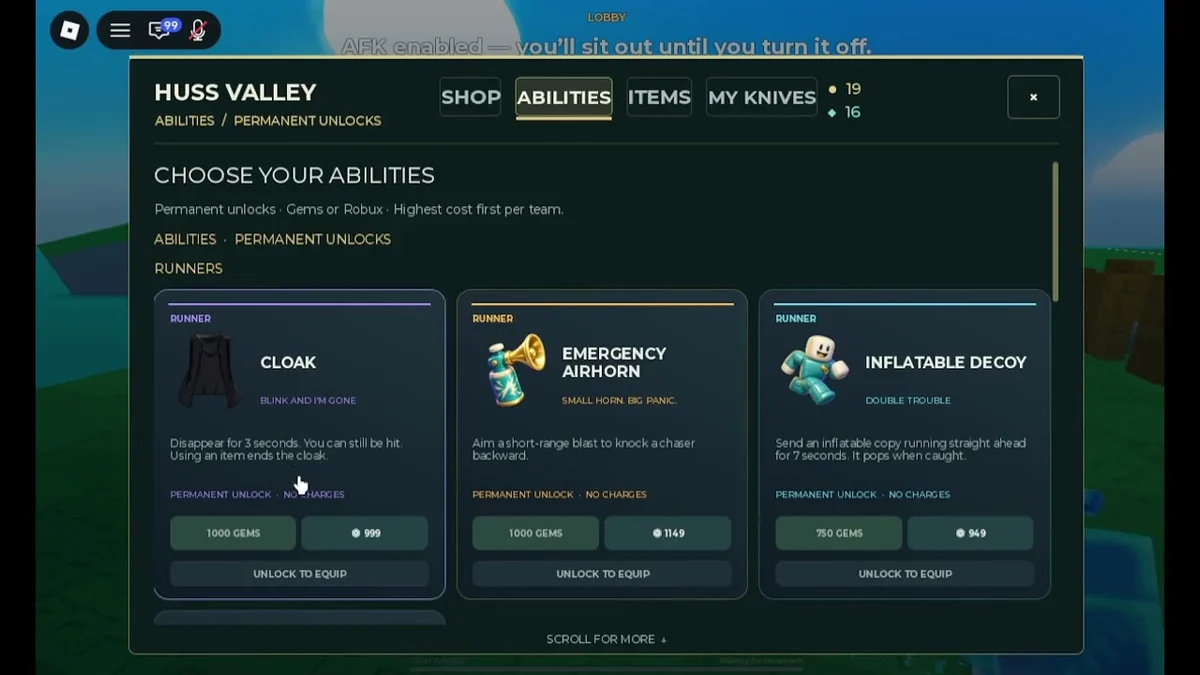
The shop route in VendoPlus’s walkthrough is Menu → Shop → Abilities. The inspected shop capture separates Runner cards, descriptions, purchase choices and the locked equipment state.
- Open Menu, then Shop, then Abilities. You are looking for the ability cards, rather than the Items or My Knives tab.
- Choose the role and read the card. Select the tool for the role you intend to use. Read its currency amount and effect before selecting a purchase option. The ability reference separates Runner cards from Chaser cards.
- Unlock an unowned card through its displayed purchase choice. The 3 October capture shows Gem and Robux options. If using Gems, first earn the amount the card requires; a locked “Unlock to Equip” state is not an equipped ability. Complete the offered purchase confirmation rather than assuming a click on a price already selected the tool.
- Equip the owned ability. The walkthrough explains selecting Equip once you own the unlock. Return to the role’s selection before the match; buying an ability and equipping it are different steps.
ProjectSupreme’s 10 October purchase recording also distinguishes buying tools from choosing the Runner and Chaser abilities he then uses. His video title’s spending amount is not an ability price list.
Currency and role conditions
Gems are the earned-currency route. Match rewards and arena pickups supply them in the early guides. The capture’s Cloak card requires 1,000 Gems, while the early guide lists Pocket Door at 400. Those dated amounts can help plan a purchase, but the displayed card is the relevant checkout amount for a later client.
The capture also offers Robux options for those cards. “Abilities can be bought with Gems” therefore should not become “all abilities can only be bought with Gems.” Nor should an in-game Robux button be treated as an item in the official gamepass list.
An XP pass has a different documented benefit. X2 EXP changes experience gain; it does not say it grants Cloak, buys Gems or equips a Runner tool.
Confirm ownership before the match
Use the ability card’s owned/equip availability to distinguish an unlocked tool from the Unlock to Equip state visible in the capture. After acquiring it, make the equipment selection for the intended role. If the purchase option remains locked, you have not reached the same state as an owned ability offering Equip.
The sources do not show one uniform “equipped” label across all later builds, so no exact success-message text is invented here. Ownership and the role’s equipment selection are the checks; an animation in a different role does not confirm that this tool was selected.
If you do not have the required Gems, continue the earning route before attempting the Gem purchase. If the card is already available, select it rather than buying an unrelated pass to reproduce another creator’s account.
Already available does not mean universally free
In Default’s 9 October update recording, One Hit Shield and Bear Trap are already available to his account, and he remarks on getting them free. That shows his account’s state; it does not establish a free-unlock requirement for every player.
The ordinary shop procedure still applies: identify the ability and role, distinguish owned from locked, then equip what is available. Use the conditional comparison to decide what a new purchase needs to solve.
 Open source
VendoPlus’ 3 October shop capture. The visible card text supports these dated descriptions and the locked Unlock to Equip state; it does not certify every later shop item.
Sources and dates
Source records checked 12 Oct 2026. Recording dates describe those recordings; they are not a new game update or a claim of firsthand testing.
- How to Get and Equip Abilites in Huss Valley RobloxVendoPlus · 2026-10-03 · Publisher metadata and recording; ASR is not a precision specification.
- GAMES.GG beginner guideLarc · 2026-10-06 · Early October match, movement, currency, Hero/Chicken and ability descriptions.
- SPENDING $100,000 FOR EVERY ABILITY IN ROBLOX HUSS VALLEYProjectSupreme · 2026-10-10 · Publisher metadata and recording; ASR is not a precision specification.
- This is SO BROKEN! (Huss Valley)Default · 2026-10-09 · Publisher metadata and recording; ASR is not a precision specification.
- Roblox pass list for Huss ValleyNine listed passes, IDs, descriptions, sale state and observed Robux prices.